
What Are Solid State Drives? Your Guide to Blazing Fast Storage
Revolutionize your computing experience with the speed and efficiency of Solid State Drives.
Boost Your Speed NowKey Takeaways
- ✓ SSDs use flash memory, not spinning platters, for data storage.
- ✓ They offer significantly faster boot times, application loading, and file transfers.
- ✓ SSDs have no moving parts, making them more durable and silent than HDDs.
- ✓ While generally more expensive per gigabyte, their performance benefits are substantial.
How It Works
When data needs to be written or read, the computer's operating system sends a request to the SSD's controller. This intelligent controller acts as the SSD's CPU, managing all data operations.
The controller then interacts with the NAND flash memory chips, which are the primary storage components. Data is stored in blocks within these memory cells, using electrical charges.
The controller employs sophisticated algorithms like wear leveling to distribute writes evenly across all memory cells, extending the SSD's lifespan. It also performs garbage collection to reclaim unused memory space efficiently.
Unlike traditional hard drives that require physical movement to locate data, SSDs can access any data instantly. This direct electronic access is what gives them their incredible speed advantage.
Understanding the Core Technology: What Are Solid State Drives?
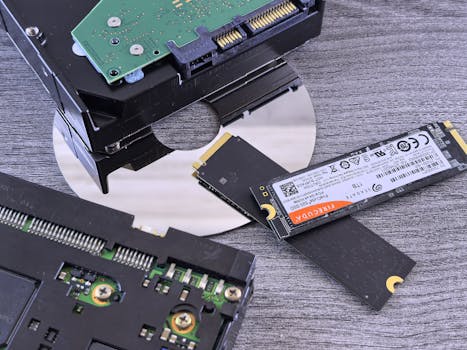 Photo: Andrey Matveev / Pexels
The Unbeatable Advantages of SSDs: Speed, Durability, and Efficiency
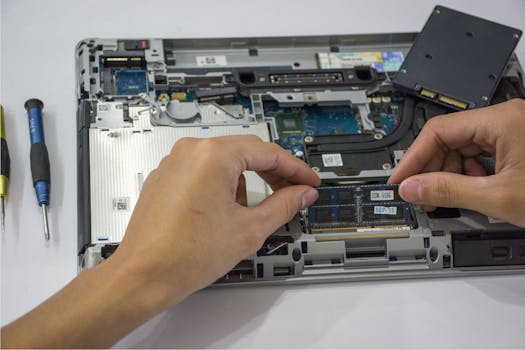 Photo: Elias Gamez / Pexels
Navigating the SSD Landscape: Types, Interfaces, and Form Factors
Photo: Elias Gamez / Pexels
Practical Considerations and Tips for Choosing Your SSD
 Photo: Avinash Kumar / Pexels
Comparison
| Feature | Solid State Drive (SSD) | Hard Disk Drive (HDD) | Hybrid Drive (SSHD) |
|---|---|---|---|
| Storage Type | Flash Memory | Magnetic Platters | Flash + Magnetic |
| Speed (Read/Write) | Excellent (500MB/s - 7GB/s+) | Poor (50-200MB/s) | Good (boots fast, then HDD speeds) |
| Durability | Excellent (no moving parts) | Poor (fragile) | Fair (some moving parts) |
| Noise Level | Silent | Audible (whirring, clicking) | Quiet (mostly silent) |
| Power Consumption | Low | High | Medium |
| Cost per GB | High | Low | Medium |
| Ideal Use | OS, applications, gaming | Mass storage, backups | Budget performance upgrade |
What Readers Say
"Upgrading to a solid state drive was the best decision for my aging laptop. Boot times went from minutes to seconds, and everything feels incredibly responsive now. I can't believe I waited so long!"
Alex P. · Seattle, WA"As a video editor, the speed of what are solid state drives is non-negotiable. My render times have significantly decreased, and scrubbing through timelines is buttery smooth. It's truly a professional-grade upgrade."
Maria G. · Austin, TX"My gaming PC loads levels and textures so much faster with an NVMe solid state drive. The difference in 'what are solid state drives' performance vs. my old HDD is night and day, drastically improving my gaming experience."
David K. · Miami, FL"While the initial cost of solid state drives can be a bit high for larger capacities, the performance gain is absolutely worth it. My only regret is not getting an even bigger one from the start."
Sarah L. · Denver, CO"For my small business servers, reliability and speed are paramount. What are solid state drives provide both, ensuring our applications run smoothly and data is accessed quickly, minimizing downtime."
John R. · Chicago, ILFrequently Asked Questions
What is the main difference between an SSD and an HDD?
The primary difference is their storage mechanism. HDDs use spinning magnetic platters and read/write heads, making them mechanical. SSDs use flash memory chips with no moving parts, making them electronic. This fundamental difference leads to SSDs being much faster, more durable, and more power-efficient than HDDs.
Are solid state drives really worth the higher cost?
For most users, yes, the performance benefits of solid state drives far outweigh the higher cost per gigabyte compared to HDDs. The dramatic improvements in boot times, application loading, and overall system responsiveness create a significantly better user experience, making your computer feel much faster and more modern.
How do I install a solid state drive?
Installation varies slightly by type. A 2.5-inch SATA SSD typically mounts into a drive bay and connects via SATA data and power cables. An M.2 NVMe SSD simply slots into a dedicated M.2 port on your motherboard and is secured with a small screw. After physical installation, you'll need to either clone your existing operating system or perform a fresh OS installation onto the new SSD.
Do solid state drives wear out faster than HDDs?
While SSDs do have a finite number of write cycles (measured in TBW - Terabytes Written), modern solid state drives are incredibly durable. For the average consumer, an SSD will likely last many years, often outliving the computer itself, before reaching its endurance limit. Advanced wear-leveling algorithms ensure even distribution of writes, further extending their lifespan.
Can I use both an SSD and an HDD in the same computer?
Absolutely! This is a very common and often recommended setup. You can install your operating system and frequently used applications on a smaller, faster SSD for performance, and use a larger, more affordable HDD for mass storage of documents, media files, and backups. This 'hybrid' approach offers the best of both worlds: speed and ample storage.
Who should consider upgrading to what are solid state drives?
Anyone looking to significantly boost their computer's performance should consider an SSD. This includes gamers seeking faster load times, creative professionals working with large files, business users needing quick access to applications, and even casual users who want a snappier, more responsive system. It's one of the most impactful upgrades you can make.
Is data on an SSD recoverable if the drive fails?
Data recovery from a failed SSD can be more complex and expensive than from an HDD, especially if the controller chip fails or the memory cells are severely damaged. However, specialized data recovery services do exist for SSDs. Regular backups are always the best defense against data loss, regardless of drive type.
What is the future of solid state drive technology?
The future of solid state drives is focused on even higher capacities, increased speeds through next-generation interfaces (like PCIe Gen 5 and beyond), and greater affordability. Advancements in NAND flash technology and controller designs will continue to push performance boundaries and make SSDs even more ubiquitous across all computing platforms.
Now that you understand what are solid state drives and their incredible benefits, it's time to experience the difference firsthand. Upgrade your system today and unlock a new level of speed, efficiency, and reliability in your computing journey.