Smart Home Devices for Beginners: Your Ultimate Guide
smart home devices for beginners

Smart Home Devices for Beginners: Your Ultimate Guide

Transform your living space into a smart, efficient, and convenient haven with our beginner-friendly guide.

Start Smart Now

Key Takeaways

  • ✓ Smart home devices can significantly enhance convenience and security.
  • ✓ Starting small with a few key devices is the best approach for beginners.
  • ✓ Compatibility between devices and platforms is crucial for a seamless experience.
  • ✓ Privacy and security are important considerations when building your smart home.

How It Works

1
Define Your Needs

Before buying, consider what problems you want to solve or what conveniences you desire. Do you want better security, automated lighting, or just to control your thermostat remotely?

2
Choose a Hub or Ecosystem

Many smart devices work best within an ecosystem (like Amazon Alexa, Google Home, Apple HomeKit). This allows them to communicate and be controlled from a central point, often a smart speaker or app.

3
Start with Simple Devices

Begin with one or two easy-to-install and understand devices, such as smart lights or a smart plug. This helps you learn the ropes without feeling overwhelmed by complex setups.

4
Expand and Automate

Once comfortable, gradually add more devices and explore automation routines. Link your smart lights to a motion sensor or schedule your thermostat to adjust based on your daily routine.

Understanding the Smart Home Ecosystem: A Foundation for Beginners

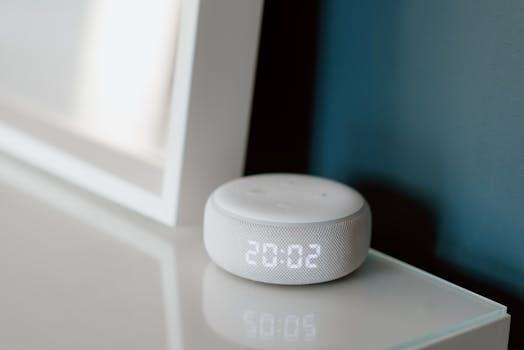
A sleek smart speaker with neon glow on reflective surface, showcasing modern technology. Photo: Jonathan Borba / Pexels
Embarking on the smart home journey can feel like stepping into a futuristic world, but for beginners, understanding the underlying ecosystem is the first and most crucial step. Think of a smart home ecosystem as the operating system for your connected devices, much like iOS or Android for your smartphone. These platforms — primarily Amazon Alexa, Google Home, and Apple HomeKit — act as the central brain, allowing various smart devices to communicate with each other and with you. Choosing the right ecosystem early on can save you a lot of headaches regarding compatibility and ease of use down the line. Each ecosystem has its strengths and weaknesses, often tied to the types of devices it supports most robustly and the level of integration it offers with other services you might already use. For instance, if you're already deeply embedded in the Apple universe with an iPhone, iPad, and Mac, HomeKit might offer the most seamless experience. If you use a lot of Google services, Google Home could be a natural fit. Amazon Alexa, on the other hand, boasts the widest range of compatible devices and is often praised for its voice control capabilities. Beyond these major players, some brands offer their own proprietary ecosystems, like Samsung SmartThings or Hubitat, which can act as a more universal hub for a wider array of devices, sometimes even bridging between the major ecosystems. However, for beginners, starting with one of the big three is generally recommended due to their user-friendly interfaces, extensive support, and vast selection of compatible devices. The goal is to create a cohesive environment where your smart lights can talk to your smart thermostat, and your smart lock can communicate with your security camera, all controlled from a single app or via voice commands. This interconnectedness is what truly defines a smart home. Without a unifying ecosystem, you might find yourself managing multiple apps for different devices, which defeats the purpose of automation and convenience. Consider your existing tech, your budget, and what kind of voice assistant you prefer when making this foundational decision. It’s not a permanent choice, but a well-thought-out start will make expanding your smart home a far more enjoyable and less frustrating experience. Remember, the beauty of a smart home lies in its ability to simplify your life, not complicate it. Understanding this core concept of an ecosystem is the first key to unlocking that potential. For more in-depth insights into general tech concepts, explore our tech guides.

Essential Smart Home Devices for Beginners: Where to Start

Person making a contactless payment using a smartwatch at a cashless checkout counter. Photo: www.kaboompics.com / Pexels
Once you have a grasp of the smart home ecosystem, the next logical step is to identify which devices are best suited for a beginner's entry point. The key is to start simple, focusing on devices that offer immediate, tangible benefits and are straightforward to install and configure. Overwhelming yourself with complex setups from the outset can quickly lead to frustration and abandonment of your smart home aspirations. One of the most popular and easiest entry points for smart home beginners is smart lighting. Devices like smart bulbs or smart light switches allow you to control your lights remotely via an app or voice commands, schedule them to turn on and off, or even change their color and brightness to set the mood. They require minimal installation – often just screwing in a bulb – and offer instant gratification. Brands like Philips Hue, TP-Link Kasa, and Wyze offer excellent options for smart lighting that are compatible with most major ecosystems. Another highly recommended starting point is smart plugs. These inexpensive devices plug into existing wall outlets and turn any ordinary appliance into a smart one. Want to turn off your coffee maker from your bed? Plug it into a smart plug. Need to schedule your fan to turn on before you get home? A smart plug can do that. They're incredibly versatile, easy to set up, and provide a low-cost way to experiment with home automation without replacing existing appliances. Smart thermostats, while a bit more involved in installation, offer significant long-term benefits in terms of energy savings and comfort. Devices like the Nest Thermostat or Ecobee SmartThermostat learn your preferences, adjust temperatures based on occupancy, and can be controlled from anywhere. This not only enhances your comfort but can also lead to noticeable reductions in your energy bills. For those concerned about home security, smart door locks and video doorbells are excellent first steps. A smart lock allows you to lock and unlock your door remotely, grant temporary access to guests, and receive notifications about door activity. Video doorbells, such as Ring or Arlo, let you see who's at your door, speak to them, and record footage, even when you're not home. These devices provide peace of mind and are generally easy to integrate into a basic smart home setup. Finally, smart speakers like the Amazon Echo Dot or Google Nest Mini serve as excellent central command centers. They not only act as your voice assistant but also often double as smart home hubs, allowing you to control all your other devices with simple voice commands. They are relatively inexpensive and provide an intuitive interface for interacting with your burgeoning smart home. Remember, the goal is gradual integration, building confidence and understanding with each new device you add to your system.

Setting Up Your First Smart Devices: A Step-by-Step Guide

Philips smart hub beside a leafy plant in a stylish indoor setting, showcasing modern home automation. Photo: Pascal 📷 / Pexels
The prospect of setting up smart home devices can seem daunting, but with a clear, step-by-step approach, even beginners can achieve a functional and convenient smart home. The initial setup process is remarkably similar across most basic smart devices, making it easy to apply what you learn from one device to the next. **Step 1: Unboxing and Powering On.** The first thing to do is carefully unbox your new smart device and plug it into a power source, if applicable. For battery-powered devices, ensure the batteries are inserted correctly. Many devices will have an indicator light that signals it's powered on and ready for setup. **Step 2: Download the Companion App.** Almost all smart home devices require a dedicated app on your smartphone or tablet for initial setup and control. Search for the brand's specific app in your device's app store (e.g., 'Philips Hue app,' 'TP-Link Kasa app'). Download and install it. **Step 3: Create an Account.** Once the app is installed, you'll typically be prompted to create an account or log in. This account is essential for managing your devices, accessing remote control features, and often for cloud-based services. Choose a strong, unique password. **Step 4: Add Your Device.** Within the app, there will usually be an option like 'Add Device,' 'Add Product,' or a '+' icon. Tap this and follow the on-screen instructions. The app will often guide you through the process of connecting the device to your home Wi-Fi network. This usually involves putting the device into a 'pairing mode' (often by holding a button or turning it on/off a certain number of times) and then selecting your Wi-Fi network and entering its password. Ensure your phone is connected to the same 2.4GHz Wi-Fi band, as many smart devices don't support 5GHz during initial setup. **Step 5: Name Your Device and Assign to a Room.** Once connected, the app will typically ask you to give your device a recognizable name (e.g., 'Living Room Lamp,' 'Bedroom Fan') and assign it to a specific room. This is crucial for organization, especially if you plan to use voice commands later. **Step 6: Test and Explore.** After setup, test the device's basic functions through the app. Can you turn the light on and off? Can you adjust the thermostat? Once basic functionality is confirmed, explore the app's advanced features. This might include setting schedules, creating scenes (e.g., 'Movie Night' scene that dims lights), or setting up automation routines. **Step 7: Connect to Your Smart Home Ecosystem (Optional but Recommended).** If you've chosen a central ecosystem like Alexa, Google Home, or HomeKit, open that app next. Look for an option to 'Add Device' or 'Works with [Ecosystem Name].' You'll usually link your device's brand account to your ecosystem account, allowing you to control the device through your chosen voice assistant and integrate it into broader smart home routines. This step transforms individual devices into a cohesive smart home system. For further guidance on general tech setup, refer to our tech tutorials.

Common Mistakes and Smart Tips for New Smart Home Users

Technician working on a laptop with multimeter in a professional workspace. Photo: Quang Nguyen Vinh / Pexels
Navigating the world of smart home technology can have its pitfalls, but with awareness and a few smart strategies, beginners can avoid common mistakes and build a robust, user-friendly system. Understanding these challenges upfront can save you time, money, and frustration. **Common Mistakes to Avoid:** * **Ignoring Compatibility:** One of the biggest blunders is buying devices that don't work together. Always check if a device is compatible with your chosen smart home ecosystem (Alexa, Google Home, HomeKit) and with other devices you plan to integrate. A patchwork of incompatible devices leads to a fragmented experience. * **Overbuying Too Soon:** Don't rush to automate your entire home at once. Starting with too many devices can be overwhelming and lead to poor integration. Begin with one or two key areas, master their functionality, and then gradually expand. * **Neglecting Network Strength:** Smart home devices rely heavily on your Wi-Fi network. A weak or overloaded network can lead to slow response times, disconnections, and general unreliability. Ensure your router is up to the task and consider Wi-Fi extenders or a mesh network if you have a large home. * **Forgetting Security and Privacy:** Every smart device is a potential entry point for cyber threats. Use strong, unique passwords for all accounts, enable two-factor authentication where available, and keep device firmware updated. Be mindful of devices with cameras and microphones and their privacy settings. * **Ignoring Updates:** Manufacturers frequently release software and firmware updates that fix bugs, improve performance, and enhance security. Regularly check for and install these updates to keep your system running smoothly and securely. **Smart Tips for Success:** * **Start with a Plan:** Before buying anything, identify your pain points or desired conveniences. Do you want to save energy, enhance security, or simply automate daily tasks? A clear goal will guide your purchases. * **Prioritize Voice Control:** If voice control is important to you, invest in a good smart speaker (Amazon Echo, Google Nest) as your central hub. It simplifies interactions and integrates seamlessly with many devices. * **Leverage Routines and Automations:** The real magic of a smart home lies in its ability to automate tasks. Explore the routine or automation features within your ecosystem's app. For example, set lights to turn on when you arrive home, or have your thermostat adjust when you leave. * **Experiment with IFTTT:** 'If This Then That' (IFTTT) is a free web-based service that allows you to create powerful custom automations between different smart devices and web services that might not natively communicate. It's a great tool for advanced users but can also be simplified for beginners to achieve specific, niche automations. * **Read Reviews and Research:** Before purchasing, read reviews from other users and consult tech websites. Look for devices known for their reliability, ease of use, and good customer support. Sometimes, spending a little more on a reputable brand pays off in the long run. * **Consider Future Expansion:** Even if you're starting small, think about where you might want to expand in the future. Choosing an ecosystem that offers a wide range of compatible devices will make future additions much easier. * **Be Patient:** Building a smart home is a journey, not a destination. There will be learning curves and occasional troubleshooting. Embrace the process, and you'll soon enjoy the benefits of a truly connected home. By avoiding these common mistakes and implementing these smart tips, beginners can confidently build a smart home that truly enhances their lifestyle and provides lasting convenience and peace of mind.

Comparison

FeatureSmart Light BulbsSmart PlugsSmart ThermostatsVideo Doorbells
Ease of SetupVery EasyVery EasyModerateModerate
Cost (Entry Level)$$$$$$$
Primary BenefitAmbiance, Remote ControlAutomation of AppliancesEnergy Savings, ComfortSecurity, Convenience
Voice Control
Requires Hub (Often)Some modelsRarelyNoNo
Privacy ConcernLowLowLowMedium

What Readers Say

"As a complete tech novice, I was intimidated by smart home devices for beginners. This guide made it so easy to understand, and I started with smart plugs. Now my coffee maker turns on automatically, and I feel so much more in control!"

Sarah J. · Austin, TX

"I used this article to pick out my first smart light bulbs, and the setup was a breeze. The step-by-step instructions were spot on. My living room lighting has never been better or easier to manage."

Mark D. · Seattle, WA

"Following the advice here, I installed a smart thermostat, and my energy bill dropped by 15% last month. It's user-friendly, and the remote control feature is a game-changer for my busy schedule."

Emily R. · Denver, CO

"The guide was mostly excellent for smart home devices for beginners, though I wish there was a bit more on specific router recommendations for larger homes. Still, it helped me choose my first smart speaker, and I'm very happy with it."

David L. · Miami, FL

"I was looking for simple smart home devices for beginners to help my elderly parents. The smart plugs and voice-controlled lights recommended here have made their daily lives so much easier and safer. Highly recommend this resource!"

Jessica M. · Chicago, IL

Frequently Asked Questions

What are the absolute easiest smart home devices for beginners to start with?

For beginners, smart plugs and smart light bulbs are typically the easiest to start with. They require minimal installation (often just plugging in or screwing in a bulb), are relatively inexpensive, and offer immediate, tangible benefits like remote control and scheduling. They provide a low-risk entry point to learn the basics of smart home technology.

Do I need a smart home hub to use smart devices?

Not always. Many modern smart devices connect directly to your home Wi-Fi network and can be controlled via their own app or a smart speaker (like Amazon Echo or Google Nest). However, a dedicated smart home hub (like Samsung SmartThings) can offer more advanced automation, better local control, and compatibility with a wider range of communication protocols, creating a more integrated system.

How do I ensure my smart devices are compatible with each other?

To ensure compatibility, it's best to choose a primary smart home ecosystem (e.g., Amazon Alexa, Google Home, Apple HomeKit) and then purchase devices that explicitly state 'Works with Alexa,' 'Works with Google Assistant,' or 'Works with HomeKit.' Many devices also support multiple ecosystems, offering more flexibility. Always check the product specifications before buying.

Are smart home devices expensive, and what's a good budget for beginners?

Smart home devices range widely in price. You can start with smart plugs or basic smart bulbs for as little as $10-$25 each. For a beginner, a budget of $50-$200 can get you a few foundational devices like a smart speaker, a couple of smart plugs, and some smart bulbs, allowing you to experience the benefits without a huge upfront investment.

What's the difference between a smart speaker and a smart home hub?

A smart speaker (like an Amazon Echo or Google Nest) primarily functions as a voice assistant and can control many Wi-Fi-enabled smart devices directly. A smart home hub, on the other hand, is a dedicated device designed to connect and manage a wider array of smart devices, often supporting different communication protocols (like Zigbee or Z-Wave) that Wi-Fi-only devices don't. Some smart speakers also have hub capabilities built-in.

Who should consider using smart home devices for beginners?

Anyone looking to simplify daily routines, enhance home security, improve energy efficiency, or simply add a layer of modern convenience to their living space should consider smart home devices. They are particularly beneficial for busy individuals, those seeking greater accessibility, or anyone curious about modern technology but unsure where to start.

Are smart home devices secure, and what about my privacy?

Smart home security and privacy are valid concerns. Most reputable brands implement security measures, but it's crucial for users to create strong, unique passwords, enable two-factor authentication, and keep device firmware updated. Be mindful of the data devices collect and adjust privacy settings in their respective apps. Choosing trusted brands generally offers better security assurance.

What are some future trends in smart home technology that beginners should be aware of?

Future trends in smart home technology include greater interoperability through standards like Matter, enhanced AI and machine learning for more proactive automation, advanced health and wellness monitoring integration, and increased focus on energy efficiency and sustainability. These advancements promise even more seamless and intuitive smart home experiences for future users.

Ready to transform your home? Start your journey with smart home devices for beginners today. Explore our recommended products and tips to build a smarter, more convenient living space, one device at a time.

Topics: smart home devices for beginnerseasy smart home setupbeginner smart home gadgetssmart home automation tipsfirst smart home devices
Leo List
Brampton weed
Adultwork