Best Webcams for Streaming 2024: Elevate Your Broadcast
best webcams for streaming 2024

Best Webcams for Streaming 2024: Elevate Your Broadcast

Unlock crystal-clear video and impress your viewers with the top webcams designed for serious streamers in 2024.

Find Your Perfect Webcam

Key Takeaways

  • ✓ Resolution matters: 1080p at 60fps is a solid baseline, with 4K offering premium detail.
  • ✓ Autofocus speed and accuracy are crucial for maintaining clarity during dynamic streams.
  • ✓ Low-light performance dictates how well your webcam handles less-than-ideal lighting conditions.
  • ✓ Built-in microphones are often sufficient for beginners, but external mics are recommended for serious audio.
  • ✓ Software features like background removal and digital zoom enhance your streaming flexibility.

How It Works

1
Define Your Streaming Needs

Consider your primary content (gaming, vlogging, education) and your budget. This helps narrow down suitable webcam categories.

2
Research Key Features

Look for resolution, frame rate, autofocus, field of view, and low-light capabilities. These specs directly impact video quality.

3
Read Reviews and Compare

Consult expert reviews and user feedback to understand real-world performance. Compare different models based on your prioritized features.

4
Test and Optimize Your Setup

Once acquired, test your webcam in your actual streaming environment. Adjust lighting, camera placement, and software settings for optimal results.

Understanding Core Webcam Features for Optimal Streaming Performance
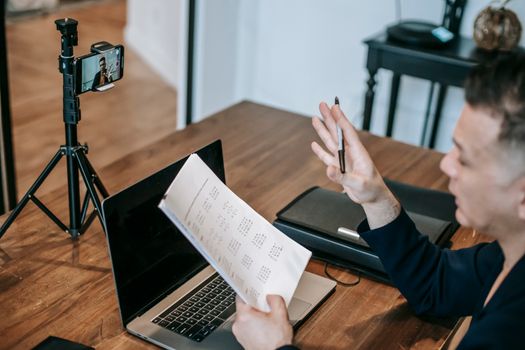
A man conducting an online teaching session using a laptop and smartphone on a tripod. Photo: Vanessa Garcia / Pexels
Choosing the best webcam for streaming in 2024 isn't just about picking the most expensive model; it's about understanding the critical features that contribute to a professional-grade broadcast. The foundation of any great stream begins with video quality, and this hinges primarily on resolution and frame rate. While 720p might suffice for casual video calls, serious streamers should aim for at least 1080p resolution. At this resolution, your viewers will see a clear, detailed image of you and your surroundings. However, resolution alone isn't enough. The frame rate, measured in frames per second (fps), dictates the smoothness of your video. A 1080p webcam at 30fps is acceptable, but 1080p at 60fps is the gold standard for streaming, especially for content that involves rapid movement, like gaming or active vlogging. This higher frame rate ensures a fluid, natural-looking video that is much more engaging for your audience, preventing jerky or choppy visuals. Beyond resolution and frame rate, autofocus is another non-negotiable feature. A fast and accurate autofocus system ensures that you remain sharp and in focus, even if you move around or lean in and out of the frame. Manual focus options can be useful for static setups, but for dynamic streamers, a reliable autofocus is paramount. Some premium webcams even offer advanced AI-powered autofocus that can track your face, keeping you perfectly centered and clear. Related to focus is the lens quality itself. Webcams with glass lenses generally offer superior image clarity and color accuracy compared to plastic lenses. The field of view (FOV) is also an important consideration. A wider FOV (e.g., 90 degrees) is great for showing more of your environment or including multiple people, while a narrower FOV (e.g., 60-70 degrees) focuses more tightly on your face, which can be ideal for solo commentary. Many modern webcams offer adjustable FOV settings through software, giving you flexibility. Low-light performance is often overlooked but incredibly important for streamers who don't have perfect studio lighting. A webcam with good low-light capabilities can produce a clear, less noisy image even in dimly lit rooms, reducing the need for extensive external lighting. This is achieved through larger sensors and advanced image processing algorithms. Look for webcams that specifically market their low-light prowess. Built-in microphones are standard, but their quality varies wildly. While convenient, most built-in webcam mics are only suitable for basic use. For professional audio, an external microphone is almost always recommended. However, a decent built-in mic can be a good starting point. Finally, the accompanying software can significantly enhance your streaming experience. Features like digital zoom, pan, tilt, exposure control, white balance adjustments, and even AI-powered background removal or replacement tools can elevate your production value. Some software also offers integration with popular streaming platforms like OBS or Streamlabs. Understanding these core features will empower you to make an informed decision and invest in a webcam that truly meets your streaming ambitions. For more detailed insights into streaming setups, check out our guide on optimizing your tech for live broadcasts. This foundational knowledge is crucial before diving into specific models.

Top Contenders: The Best Webcams for Streaming in 2024

Woman using smartphone and ring light in office for content creation. Photo: RDNE Stock project / Pexels
As the streaming landscape continues to evolve, so does the technology powering it. In 2024, several webcams stand out as top contenders, each offering a unique blend of features, performance, and value for different types of streamers. The Logitech Brio remains a perennial favorite, particularly for its 4K resolution capabilities. While 4K streaming is still a niche for many, the Brio's ability to capture incredibly detailed video, even when downscaled to 1080p, provides a crisp, professional image. Its HDR support ensures excellent color reproduction and dynamic range, while its advanced autofocus and RightLight 3 technology deliver superior low-light performance. The Brio also offers adjustable field of view, making it versatile for various streaming scenarios, from tight headshots to wider shots of your setup. Its robust build quality and integration with Logitech's G Hub software for granular control further solidify its position as a premium choice, albeit with a premium price tag. For those seeking a high-performance 1080p 60fps experience without the 4K premium, the Elgato Facecam is a formidable option. Designed specifically for streamers, it foregoes an internal microphone to focus entirely on delivering exceptional video quality. Its prime lens with a large aperture (f/2.4) and a pro-grade Sony STARVIS CMOS sensor excel in various lighting conditions, producing bright, clear, and vibrant images. The Facecam's fixed focus ensures consistent sharpness for face-to-camera streams, and its native software, Camera Hub, offers extensive controls for ISO, shutter speed, white balance, and more, allowing for fine-tuned image customization. Its solid, compact build and simple mounting make it a favorite among dedicated content creators who prioritize image fidelity above all else. The Razer Kiyo Pro is another strong contender, particularly for its exceptional low-light performance and uncompressed 1080p 60fps output. It features a large, high-performance sensor that captures more light, resulting in remarkably clear and detailed video even in challenging lighting environments. The Kiyo Pro also boasts HDR capabilities and a wide-angle lens with adjustable field of view, giving streamers the flexibility to capture more of their surroundings or focus tightly on themselves. Its robust design and versatile mounting options add to its appeal. For streamers who often find themselves in less-than-ideal lighting or want the best possible image without complex lighting setups, the Kiyo Pro is an excellent investment. Finally, for budget-conscious streamers who still demand quality, the Logitech C922 Pro Stream Webcam continues to be a fantastic choice. While it doesn't offer 4K, its 1080p 30fps or 720p 60fps capabilities are more than sufficient for many aspiring streamers. It delivers sharp, well-exposed video, and its reliable autofocus and decent low-light correction provide a solid foundation. The C922 also includes a capable built-in stereo microphone, making it a true all-in-one solution for beginners. Its affordability combined with consistent performance makes it an enduring recommendation for those just starting their streaming journey or looking for a dependable secondary camera. Each of these webcams caters to slightly different needs and budgets, but all represent excellent choices for elevating your streaming quality in 2024.

Beyond the Camera: Essential Accessories and Software for Pro Streaming
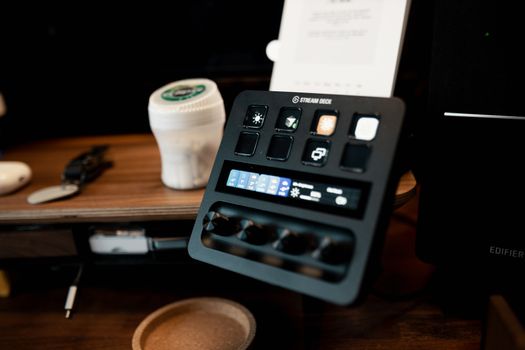
A Stream Deck on a wooden desk, featuring various buttons and controls in a home studio setup. Photo: Josh Sorenson / Pexels
While the webcam itself is the star of your video feed, achieving a truly professional streaming setup in 2024 extends far beyond just the camera. A high-quality webcam is a crucial starting point, but without the right supporting accessories and software, its full potential may go unrealized. One of the most impactful upgrades you can make is to your lighting. Even the most expensive webcam will struggle in poor lighting conditions. A simple ring light or a pair of softbox lights can dramatically improve your video quality, making you appear brighter, clearer, and more vibrant. Good lighting eliminates shadows, reduces graininess, and ensures accurate color reproduction. Look for lights with adjustable brightness and color temperature to match your environment and desired aesthetic. Positioning your lights correctly, typically in front of and slightly above you, is key to achieving a flattering and professional look. Next, consider your audio setup. As mentioned earlier, built-in webcam microphones are generally entry-level. Investing in a dedicated microphone is arguably as important as your webcam for audience engagement. Options range from affordable USB microphones like the Blue Yeti or Rode NT-USB Mini, which offer significant improvements over built-in mics, to professional XLR microphones that require an audio interface. A good microphone ensures your voice is clear, crisp, and free from background noise, making your stream much more enjoyable to listen to. Pairing your microphone with a boom arm can help position it optimally and keep your desk clear, while a pop filter will eliminate harsh 'p' and 'b' sounds. Mounting options for your webcam are also important for flexibility and stability. While most webcams come with a standard monitor clip, a dedicated tripod or a desk-mounted arm can offer much greater control over camera angles and stability. This allows you to position your webcam exactly where you need it, whether for a headshot, a wider view, or even an overhead shot for creative content. A stable mount also prevents camera shake, which can be distracting for viewers. Software plays an equally vital role in optimizing your streaming experience. Open Broadcaster Software (OBS Studio) and Streamlabs Desktop are the industry standards for managing your stream layout, overlays, alerts, and scenes. These powerful, free tools allow you to combine your webcam feed with gameplay, screen shares, and other media, creating a dynamic and engaging broadcast. Webcam-specific software, often provided by the manufacturer (e.g., Logitech G Hub, Elgato Camera Hub), offers granular control over your camera's settings, including exposure, white balance, zoom, and even advanced features like background removal or virtual greenscreens. Utilizing these software tools effectively can elevate your production value significantly. Exploring resources on advanced streaming techniques can further refine your setup. By investing in these essential accessories and mastering the software, you can transform a good webcam into the centerpiece of a truly professional streaming studio.

Common Mistakes and Pro Tips for Webcams in Streaming
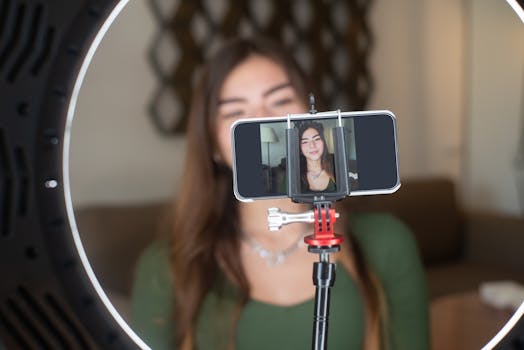
A young woman live streams from home using a smartphone and ring light setup. Photo: Kampus Production / Pexels
Even with the best webcam for streaming in 2024, common pitfalls can undermine your efforts. Avoiding these mistakes and adopting professional tips can significantly enhance your stream quality and viewer experience. One of the most frequent errors is neglecting proper lighting. Many streamers rely solely on ambient room light, which often results in grainy, dark, or poorly colored video. **Common Mistakes to Avoid:** * **Poor Lighting:** Insufficient or badly placed lighting is the number one killer of webcam quality. Backlighting, where a window or bright light source is behind you, will silhouette you and make your face dark. * **Cluttered Backgrounds:** A messy background is unprofessional and distracting. It draws attention away from you and your content. * **Incorrect Camera Angle:** Positioning the webcam too low (looking up your nose) or too high (making you look small and distant) can be unflattering. * **Reliance on Built-in Mic:** While convenient, most built-in webcam microphones deliver subpar audio quality, often picking up room echo and background noise. * **Ignoring Software Settings:** Default webcam settings are rarely optimal. Not adjusting exposure, white balance, or autofocus can lead to a washed-out or poorly focused image. * **Unstable Mounting:** A wobbly webcam mount can cause distracting camera shake. **Pro Tips for Optimal Webcam Streaming:** * **Invest in Dedicated Lighting:** Even an affordable ring light or LED panel can make a world of difference. Position it in front of you, slightly above eye level, to illuminate your face evenly. * **Declutter and Optimize Your Background:** Keep your streaming area clean and minimalist, or use a greenscreen for virtual backgrounds. A clean background helps keep focus on you. * **Eye-Level Camera Placement:** Position your webcam at or slightly above eye level. This creates a natural, engaging angle that makes it feel like you're looking directly at your viewers. * **Upgrade Your Audio:** Prioritize a dedicated USB microphone. Clear audio is paramount for viewer retention. * **Master Your Webcam Software:** Dive into your webcam's software settings. Experiment with exposure, white balance, contrast, and sharpness to find the perfect look for your environment. Save these settings as a profile. * **Ensure a Stable Mount:** Use a sturdy tripod, desk clamp, or monitor mount to eliminate camera shake. * **Test Before Going Live:** Always do a quick test stream or recording to check video and audio quality, lighting, and background. This helps catch issues before your audience sees them. * **Maintain Good Posture:** Sit up straight and maintain good posture to appear confident and engaged. These simple adjustments can significantly elevate your streaming presence and distinguish your broadcasts.

Comparison

FeatureLogitech BrioElgato FacecamRazer Kiyo ProLogitech C922
Max Resolution/FPS4K 30fps / 1080p 60fps1080p 60fps1080p 60fps1080p 30fps / 720p 60fps
AutofocusYes (Fast & Accurate)Fixed FocusYes (Fast & Accurate)Yes
Low-light PerformanceExcellent (RightLight 3)Very Good (STARVIS Sensor)Excellent (Large Sensor)Good (RightLight 2)
Built-in MicYes (Stereo)NoYes (Omnidirectional)Yes (Stereo)
Field of View (FOV)65°/78°/90° (Adjustable)82°103°/90°/80° (Adjustable)78°
Price Range (USD)$150-$200$150-$200$150-$200$70-$100
HDR Support

What Readers Say

"The Logitech Brio completely transformed my Twitch stream. The 4K clarity is insane, and the autofocus keeps me perfectly sharp even when I'm reacting wildly. Best investment for my channel this year!"

Sarah J. · Austin, TX

"I switched to the Elgato Facecam, and the difference in my video quality is night and day. The colors are so vibrant, and it handles my room's inconsistent lighting like a champ. Highly recommend for serious streamers."

Mark D. · Seattle, WA

"My YouTube tutorials look so much more professional now thanks to the Razer Kiyo Pro. The low-light performance is a lifesaver, as I often stream in the evenings. My viewers have commented on the improved video clarity."

Emily R. · Orlando, FL

"The Logitech C922 is fantastic for its price point. It's a solid, reliable webcam that delivers consistent 1080p. While not as feature-rich as the premium options, it's perfect for getting started without breaking the bank."

Chris P. · Denver, CO

"As a remote educator, having a clear video feed is crucial. The Brio's wide field of view and excellent image quality make my online classes feel much more engaging. It's truly one of the best webcams for streaming 2024 offers for professionals."

Alex T. · New York, NY

Frequently Asked Questions

What resolution and frame rate should I aim for when choosing a streaming webcam?

For optimal quality, you should aim for a webcam capable of at least 1080p resolution at 60 frames per second (fps). This combination provides sharp, detailed video with smooth motion, which is crucial for engaging your audience, especially in fast-paced content like gaming. While 4K webcams exist, 1080p 60fps remains the sweet spot for most streamers due to bandwidth considerations and platform support.

Do I really need an expensive webcam for streaming?

Not necessarily. While premium webcams like the Logitech Brio or Elgato Facecam offer superior image quality and features, excellent streaming can be achieved with mid-range options like the Logitech C922, especially for beginners. The key is to balance your budget with your specific content needs and viewer expectations. Investing in good lighting and audio can often make a bigger difference than just a high-end camera alone.

How do I set up my webcam for the best streaming quality?

First, ensure your webcam is mounted securely at eye level. Second, optimize your lighting by adding a key light in front of you and minimizing backlighting. Third, use your webcam's proprietary software (e.g., Logitech G Hub, Elgato Camera Hub) to adjust settings like exposure, white balance, and focus. Finally, integrate and configure your webcam within your streaming software (OBS Studio, Streamlabs Desktop) to ensure it's sending the highest quality feed.

Are 4K webcams worth it for streaming in 2024?

For most streamers, 4K webcams offer diminishing returns compared to their 1080p 60fps counterparts. While they capture incredible detail, many streaming platforms don't natively support 4K streaming at high frame rates, and it demands significant bandwidth from both you and your viewers. However, if you plan to record content for later editing or want the absolute best possible image for downscaled 1080p, a 4K webcam can be a worthwhile investment for future-proofing.

What's the difference between a webcam and a DSLR/mirrorless camera for streaming?

Webcams are plug-and-play devices designed for convenience, offering good quality in a compact form factor, often with built-in microphones. DSLR/mirrorless cameras, while requiring capture cards and more complex setups, offer significantly larger sensors and interchangeable lenses, leading to superior image quality, depth of field, and low-light performance. Webcams are ideal for ease of use and affordability, while DSLRs are for maximum cinematic quality.

Who should prioritize autofocus in a streaming webcam?

Streamers who move frequently, lean in and out of the frame, or have dynamic content should prioritize a webcam with fast and accurate autofocus. This ensures you remain sharp and clear throughout your broadcast. For streamers with very static setups, a fixed-focus camera can also work well, often offering consistent sharpness without the potential for focus hunting.

How can I improve my webcam's audio if I don't have an external microphone?

If you're relying on your webcam's built-in microphone, try to speak clearly and stay close to the camera. Reduce background noise by closing windows and doors, and consider using acoustic panels or soft furnishings in your room to minimize echo. Some streaming software also offers basic noise suppression filters that can help, though they are not a substitute for a dedicated microphone.

What are the future trends for streaming webcams?

Future trends for streaming webcams include increased integration of AI for advanced features like intelligent framing, more sophisticated background removal without greenscreens, and enhanced low-light performance through larger sensors and computational photography. We can also expect more webcams with modular designs, interchangeable lenses, and tighter integration with professional streaming ecosystems, blurring the lines between traditional webcams and entry-level dedicated cameras.

Choosing among the best webcams for streaming in 2024 is your first step towards a professional broadcast. Equip yourself with the right camera and accessories, and watch your content flourish. Elevate your stream today!

Topics: best webcams for streaming 2024streaming camera reviewswebcam for Twitchprofessional streaming setup4K webcams for streamers
Leo List
Brampton weed
Adultwork EstrelaBet Vai de Bet R7 Bet Betão Galera Bet Rainbet Bet9ja Shop SportyBet BetKing Sisal Loto Foot Hollywoodbets YesPlay Odibets RushBet Jugabet BetWarrior BetCity MSport betPawa Fortebet