Discover the Best Budget Laptops Under $500 for Every Need
July 30, 2026 16 min read 3,185 words
Unlock productivity and entertainment without overspending. Find your perfect, affordable laptop today.
Find Your Laptop Now
Navigating the Sub-$500 Laptop Landscape: What to Expect
 Photo: Lisa from Pexels / Pexels
The quest for the best budget laptops under $500 often begins with a healthy dose of skepticism. Can you truly find a reliable, capable machine without emptying your wallet? The answer, surprisingly, is a resounding yes – provided you know what to look for and manage your expectations. This price bracket has seen remarkable advancements in recent years, largely due to fierce competition and improved component efficiency. While you won't find cutting-edge gaming performance or professional-grade video editing capabilities here, you can absolutely secure a device perfectly suited for daily computing tasks, educational pursuits, and even light entertainment.
When we talk about 'budget' in this context, we're not talking about sacrificing core functionality. Instead, it means prioritizing essentials. You'll often see a focus on solid-state drives (SSDs) for faster boot times and application loading, rather than larger, slower traditional hard drives. Processors will typically be entry-level Intel Core i3s or AMD Ryzen 3s, or their respective Celeron/Pentium and Athlon counterparts, which are more than adequate for web browsing, word processing, email, and streaming. RAM usually hovers around 4GB to 8GB; we highly recommend aiming for 8GB if at all possible, as it significantly improves multitasking fluidity. Screen resolution is another key area; while some might still offer 720p, a Full HD (1080p) display is increasingly common and makes a world of difference for readability and media consumption.
Beyond specifications, consider the ecosystem. Chromebooks, for instance, dominate a significant portion of this market segment. Running Google's ChromeOS, they offer incredible value for users who primarily operate within a web browser, rely on cloud storage, and use Google Workspace (Docs, Sheets, Slides). They are fast, secure, and boast exceptional battery life, making them ideal for students or those needing a highly portable, low-maintenance device. On the other hand, Windows laptops at this price point provide greater software compatibility and flexibility, allowing you to run a wider range of traditional desktop applications. However, they might come with slightly less powerful hardware or compromises in build quality to stay within budget. It's a trade-off between versatility and streamlined performance. Understanding these fundamental differences is your first step towards making an informed decision and finding a laptop that truly fits your needs without exceeding your budget. Our goal is to guide you through these choices, highlighting the strengths and weaknesses of various options to ensure you get the most bang for your buck in the competitive sub-$500 arena. For more general tech insights, visit our
tech news section.
Key Specifications to Prioritize for Optimal Value
 Photo: Atlantic Ambience / Pexels
When searching for the best budget laptops under $500, understanding which specifications offer the most impact for your dollar is crucial. While you won't get every high-end feature, smart choices in core components can elevate your user experience significantly. Let's break down the most important aspects:
**Processor (CPU):** This is the brain of your laptop. At this price point, you'll typically encounter Intel Celeron, Pentium, Core i3, or AMD Athlon and Ryzen 3 processors. For basic web browsing, email, and document work, Celeron/Pentium/Athlon can suffice, but they will feel sluggish with multiple tabs or applications open. We strongly recommend aiming for an Intel Core i3 (10th generation or newer) or an AMD Ryzen 3 (3000 series or newer) if your budget allows. These offer a noticeable leap in performance, making multitasking smoother and ensuring your laptop feels responsive for years to come. Avoid anything older than 8th gen Intel or 2000 series AMD if possible, as they might struggle with modern software demands.
**RAM (Random Access Memory):** This is where your laptop stores data it's actively using. 4GB of RAM is the absolute minimum you'll find, often in Chromebooks or entry-level Windows machines. While acceptable for a single browser tab, it quickly becomes a bottleneck. **8GB of RAM is the sweet spot for budget laptops.** It allows for comfortable multitasking, running several applications simultaneously, and a much smoother overall experience. If you see a model with 8GB RAM, prioritize it. Upgradability is rare in this price range, so get what you need upfront.
**Storage (SSD vs. HDD):** This is arguably the most critical component for perceived speed. Traditional Hard Disk Drives (HDDs) are slow, noisy, and outdated for primary laptop use. **Always prioritize a Solid State Drive (SSD).** Even a smaller 128GB or 256GB SSD will make your laptop feel infinitely faster than a 1TB HDD. Boot times will be seconds instead of minutes, applications will load instantly, and the system will feel much more responsive. While 256GB is ideal, a 128GB SSD is still preferable to any HDD. You can always supplement storage with external drives or cloud services. The difference an SSD makes cannot be overstated.
**Display:** Most laptops under $500 will feature a 15.6-inch screen, though 14-inch models are also common. The key spec here is resolution. Aim for Full HD (1920x1080 pixels), often referred to as 1080p. This provides sharp text and images, making reading and streaming much more enjoyable. Some very cheap models might still offer 1366x768 resolution, which is noticeably pixelated and should be avoided if possible. Panel type also matters: IPS panels offer better viewing angles and color reproduction than TN panels, though IPS is less common at the lowest end of this budget.
**Battery Life:** For a portable device, battery life is paramount. Look for laptops that promise at least 6-8 hours of mixed-use battery life. Chromebooks often excel here, frequently offering 10+ hours. Windows laptops can vary widely, so check reviews for real-world battery performance rather than manufacturer claims. A laptop that needs to be constantly tethered to a charger loses much of its utility.
**Build Quality and Portability:** While premium materials are rare, look for sturdy hinges and minimal flex in the keyboard and screen. Plastic is standard, but some plastics are better than others. Consider the weight and thickness if portability is a key concern. A lighter laptop is easier to carry to classes or between rooms. Always check for essential ports like USB-A, USB-C (preferably for charging and data), HDMI, and an SD card reader, depending on your peripherals. Don't compromise on these core components; they form the backbone of your computing experience.
Top Contenders: Recommended Models and Their Strengths
 Photo: olia danilevich / Pexels
Within the fiercely competitive sub-$500 market, certain models consistently rise above the rest by offering a compelling blend of features, performance, and value. While specific models can fluctuate based on sales and new releases, several product lines and configurations typically represent the best budget laptops under $500. Here, we highlight some common archetypes and what makes them stand out.
**Chromebooks: The Cloud-Centric Powerhouses**
For users whose primary activities revolve around web browsing, email, Google Workspace (Docs, Sheets, Slides), and media consumption, a Chromebook is often the undisputed champion in this price range. Models like the **Acer Chromebook Spin 311/314**, **Lenovo Chromebook Duet**, or **HP Chromebook x360** frequently appear. Their strengths include: incredibly fast boot times (often under 10 seconds), exceptional battery life (10+ hours is common), robust security features, and a simple, intuitive operating system. Because ChromeOS is lightweight and cloud-dependent, these devices can run very smoothly even with less powerful processors and 4GB of RAM, though 8GB is always preferred. The Lenovo Chromebook Duet, in particular, offers a detachable keyboard, effectively functioning as a tablet and a laptop, providing incredible versatility for its price. Chromebooks are ideal for students, casual users, and anyone needing a reliable, low-maintenance second device. However, they are not suitable if you require specific Windows or macOS software, or if you need powerful local storage and processing for demanding applications.
**Windows Laptops: The Versatile Workhorses**
For those who need full Windows compatibility for specific software, traditional gaming, or local file management, there are strong contenders as well. Look for offerings from brands like **Acer (e.g., Aspire series)**, **Lenovo (e.g., IdeaPad series)**, and **HP (e.g., Pavilion or basic 15-inch models)**. The key here is to find configurations that include an Intel Core i3 or AMD Ryzen 3 processor, 8GB of RAM, and a 256GB SSD. These specifications create a surprisingly capable machine for everyday productivity, light photo editing, and streaming. Models like the **Acer Aspire 3** or **Lenovo IdeaPad 3** often hit this sweet spot during sales. They offer a familiar user experience, a wider array of ports, and the flexibility to install any Windows-compatible software. While battery life might not match Chromebooks, and build quality can feel more utilitarian, they provide unparalleled software flexibility within the budget. It's crucial to check the specific processor generation and RAM/storage configuration, as these brands often sell many variants under the same model name. An older i3 with 4GB RAM will be a very different experience than a newer i3 with 8GB. Remember that these machines are designed for general use; don't expect them to handle graphically intensive games or video rendering projects. For a deeper dive into specific model comparisons, check out our
tech reviews.
**Refurbished/Open Box Options: Unlocking Premium Features**
Another avenue to consider, though it requires more careful vetting, is the refurbished or open-box market. Reputable retailers often sell certified refurbished laptops that were returned or lightly used, often with significant discounts. You might find a slightly older generation Intel Core i5 or AMD Ryzen 5 laptop, or one with a better screen or build quality, that originally retailed for $700-$800, now available under $500. This is an excellent way to get more premium features for less. Always ensure the seller offers a warranty (at least 90 days), a clear return policy, and a 'certified refurbished' stamp. Check reviews specifically for the seller's refurbished products. While it involves a bit more risk and research, this path can lead to some of the best budget laptops under $500 that punch well above their weight class in terms of performance and features.
Maximizing Your Budget Laptop's Performance and Longevity
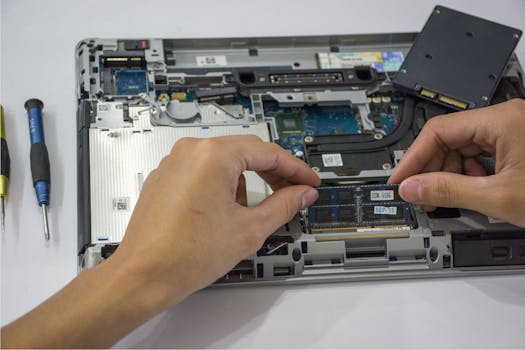 Photo: Elias Gamez / Pexels
Acquiring one of the best budget laptops under $500 is just the beginning. To ensure it serves you well for years and maintains optimal performance, a few best practices are essential. These tips focus on software management, hardware care, and smart usage habits.
**Software Optimization:**
* **Uninstall Bloatware:** Many new Windows laptops come pre-installed with unnecessary software (bloatware) that consumes system resources. Take time to uninstall programs you don't need from the 'Apps & Features' section in Windows Settings. This frees up storage and RAM, making your laptop feel snappier.
* **Keep OS and Drivers Updated:** Regular updates for Windows or ChromeOS include performance enhancements, security patches, and driver updates that can improve hardware compatibility and stability. Don't defer these for too long.
* **Use a Lightweight Browser:** While Chrome is popular, it can be a RAM hog. Consider using Microsoft Edge or Firefox, which often have better memory management, especially on systems with 8GB RAM or less.
* **Limit Startup Programs:** Too many programs launching at startup can significantly slow down your boot time and consume resources in the background. Manage these through Task Manager (Windows) or settings (ChromeOS) to only enable essential applications.
* **Cloud Storage & File Management:** With potentially limited SSD space, leverage cloud storage services like Google Drive, OneDrive, or Dropbox. Regularly move large files (photos, videos) off your primary drive. Delete unnecessary downloads and empty your recycle bin.
**Hardware Care:**
* **Keep it Cool:** Overheating can degrade performance and shorten component lifespan. Ensure your laptop's vents are clear and not blocked by surfaces like blankets. Consider a laptop cooling pad if you frequently use it for extended periods or in warm environments.
* **Clean Regularly:** Dust buildup inside can impede airflow and cause overheating. Periodically clean the exterior, keyboard, and screen with appropriate cleaners. If comfortable, you might carefully clean accessible vents with compressed air (ensure the laptop is off).
* **Protect the Screen:** The screen is one of the most fragile and expensive components. Avoid touching it with dirty hands and always close the lid gently. Use a soft cloth to clean smudges.
* **Handle with Care:** Budget laptops often have plastic builds that are less durable than premium models. Avoid dropping them, placing heavy objects on them, or twisting the screen. Use a padded sleeve or bag when transporting.
**Smart Usage Habits:**
* **Close Unused Tabs and Applications:** This is especially important for laptops with 4GB or 8GB of RAM. Each open tab and application consumes memory, so closing what you're not actively using can free up resources.
* **Optimize Power Settings:** Adjust your power plan to balance performance and battery life. 'Balanced' is often a good default, but you can switch to 'Power Saver' for maximum battery longevity when not needing peak performance.
* **Avoid Overcharging:** While modern batteries have protection circuits, regularly draining and recharging within the 20-80% range can theoretically extend battery life over many cycles, though this is less critical than it once was. Avoid leaving it plugged in at 100% for weeks on end.
By following these simple yet effective strategies, you can significantly enhance the speed, responsiveness, and overall lifespan of your budget laptop, ensuring you get the most out of your under-$500 investment.